Quickstart
From pip install to a tracked call in about five minutes.
Install the SDK
pip install solwynPython 3.11+. The SDK ships py.typed. On Node? Use the TypeScript quickstart, on Node.js 22 or 24. Optional extras (e.g. solwyn[openai]) pin tested provider-SDK
floors and are listed in the configuration reference.
Get your Solwyn API key
You need a Solwyn API key (solwyn_sk_…) and the name of the project it reaches. A new project comes with
a key for that project. No account yet? You sign up in the browser when solwyn login sends you there.
uv tool install --python 3.11 'solwyn-cli>=0.5.1'
solwyn login
solwyn projects create --name my-app --budget 50 --mode hard_deny --store-key
solwyn login prints a URL and a code. Open the URL, sign up or sign in, verify your email, check the code and
approve. Creating a project needs one more approval: projects create prints an approval URL and waits until you
approve it. --store-key puts the key in the CLI's credential store without printing it. Inside a git repository it
also writes .solwyn.env, which names the project (SOLWYN_PROJECT="my-app"). Commit that file: it holds no secret.
To run your app, hand the stored key and the project to that one command as SOLWYN_API_KEY and SOLWYN_PROJECT:
(solwyn_env="$(solwyn --format table keys env)" && eval "$solwyn_env" && exec python app.py)The subshell keeps the key out of your shell, and nothing runs when no key is stored. --format table asks
keys env for the plain export lines that eval expects. See keys env.
--mode hard_deny blocks calls at the cap; leave it out for alert_only, which lets calls continue and fires
alerts. The CLI needs Python 3.11 or newer. See Installation,
Scoped login and projects create.
Setting up with Claude Code, Codex or Cursor? Let your agent do the wiring.
- Sign up at app.solwyn.ai. The onboarding wizard creates your first project: name, budget, and enforcement mode in one form.
- The key is shown once at creation, with the project's name. Copy both then. The key is masked everywhere after.
export SOLWYN_API_KEY=solwyn_sk_...
export SOLWYN_PROJECT=my-app
Full walkthrough with screenshots: Get your API key.
The SDK reads SOLWYN_API_KEY and SOLWYN_PROJECT. SOLWYN_PROJECT is a project name or its proj_ id. Never
commit the key.
Wrap your client
import os
from openai import OpenAI
from solwyn import Solwyn

client = Solwyn(
    OpenAI(),                                  # OPENAI_API_KEY from env
    api_key=os.environ["SOLWYN_API_KEY"],
    project=os.environ["SOLWYN_PROJECT"],
)
response = client.chat.completions.create(
    model="gpt-4o",
    messages=[{"role": "user", "content": "Hello from Solwyn!"}],
)
print(response.choices[0].message.content)
client.close()
import os
from anthropic import Anthropic
from solwyn import Solwyn
client = Solwyn(
Anthropic(),
api_key=os.environ["SOLWYN_API_KEY"],
project=os.environ["SOLWYN_PROJECT"],
)
response = client.messages.create(
model="claude-sonnet-4-5",
max_tokens=1024,
messages=[{"role": "user", "content": "Hello from Solwyn!"}],
)
print(response.content[0].text)
client.close()import os
from google import genai
from solwyn import Solwyn
gc = genai.Client(api_key=os.environ["GEMINI_API_KEY"])
client = Solwyn(
gc,
api_key=os.environ["SOLWYN_API_KEY"],
project=os.environ["SOLWYN_PROJECT"],
)
response = client.models.generate_content(
model="gemini-2.0-flash",
contents="Hello from Solwyn!",
)
print(response.text)
client.close()import os
import boto3
from solwyn import Solwyn
bedrock = boto3.client("bedrock-runtime", region_name="us-east-1")
client = Solwyn(
bedrock,
api_key=os.environ["SOLWYN_API_KEY"],
project=os.environ["SOLWYN_PROJECT"],
)
response = client.converse(
modelId="us.anthropic.claude-3-5-sonnet-20241022-v2:0",
messages=[{"role": "user", "content": [{"text": "Hello from Solwyn!"}]}],
inferenceConfig={"maxTokens": 1024},
)
print(response["output"]["message"]["content"][0]["text"])
client.close()import os
from openai import OpenAI
from solwyn import Solwyn
client = Solwyn(
OpenAI(base_url="https://api.groq.com/openai/v1", api_key=os.environ["GROQ_API_KEY"]),
api_key=os.environ["SOLWYN_API_KEY"],
project=os.environ["SOLWYN_PROJECT"],
)
response = client.chat.completions.create(
model="llama-3.3-70b-versatile",
messages=[{"role": "user", "content": "Hello from Solwyn!"}],
)
print(response.choices[0].message.content)
client.close()Non-default-port or ambiguous endpoint? Name it: Solwyn(OpenAI(base_url=...), api_key=..., project=..., provider="vllm"). See OpenAI-compatible providers.
Solwyn reads token counts from the response — never your prompts or completions.
Your existing call signature is unchanged; client.close() flushes the final usage report.
The client checks the key and project once, before its first call, and raises ConfigurationError if Solwyn
refuses them. Call client.validate() to check at startup instead.
Using asyncio? AsyncSolwyn mirrors the same surface — see Async usage.
See your first call
Within seconds, the call is recorded as a cost event: token breakdown, model, and cost attributed to your project.
solwyn --project my-app budget status
solwyn --project my-app costs --group-by day --range 7d
budget status shows the limit, current usage, and mode. costs shows the call's cost and tokens.
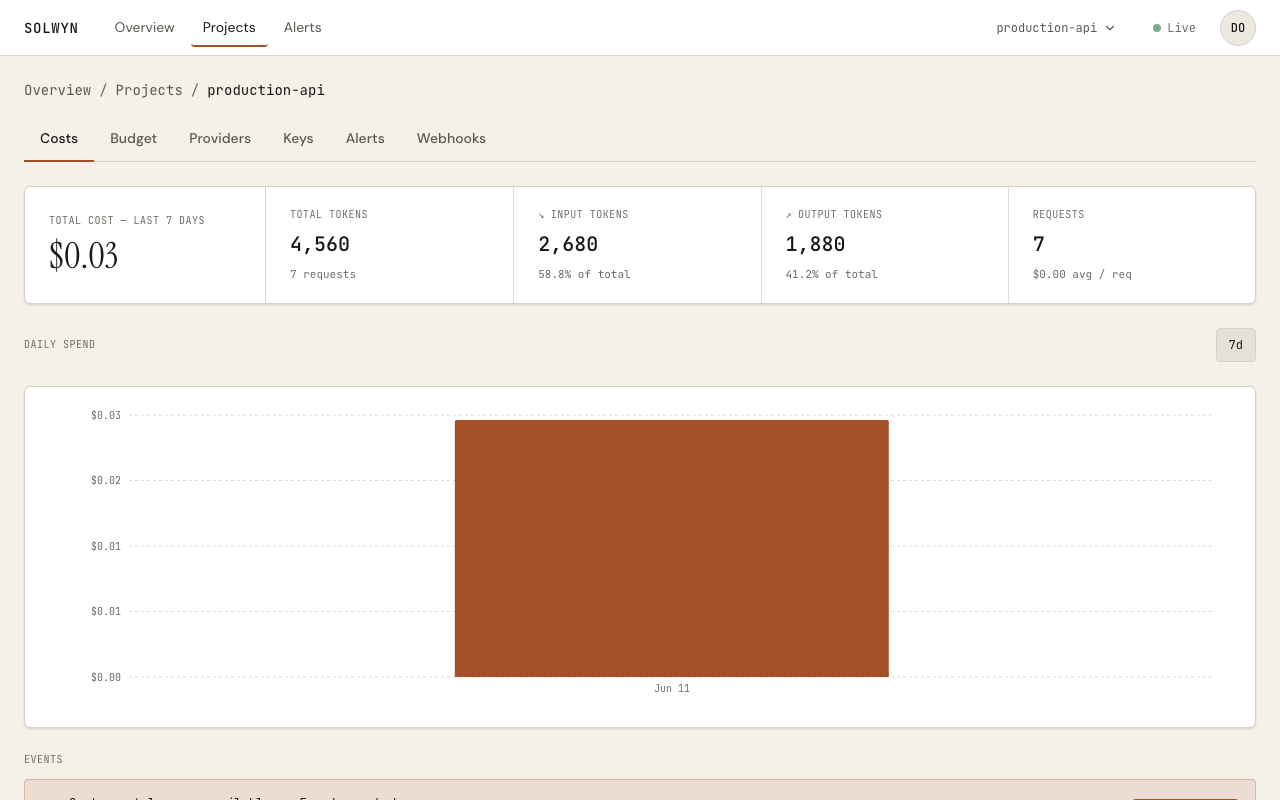
A default alert at 100% of your budget is already armed, so you're covered without configuring anything.
Every plan can hard-deny. The Free plan allows one hard-cap project, so a project you created with
--mode hard_deny blocks calls at its cap. A second hard_deny project on Free is refused with upgrade_required; other
Free projects are alert_only, where calls continue past the cap and alerts fire.
Beyond chat: the OpenAI Responses API, embeddings, images, audio, and video calls are tracked through the same wrapper — see Surface coverage.
Next steps
Set a budget
Alert-only vs hard-deny, and what happens at the limit.
Add provider failover
Automatic cross-provider retry with translation, and cost-aware routing.
Attribute cost per agent
solwyn.run() scopes spend to a named agent run, with tags and nesting.
Stop a runaway run
An operator stop from the dashboard, or local velocity detection.
Test your enforcement
Script denials, outages, and kills with the zero-network double.
Plug into a framework
OpenAI Agents, LangChain and LangGraph, CrewAI.
How privacy works
The exact wire contract — what is and isn't transmitted.